Settle Group Reservation Folio Balance to Close Group Master Folio
Stay is enhanced to enforce the settlement of all group reservation folio balances before a group folio can be closed. Previously, the group master folio could be closed independently without closing the associated group reservation folios.
Feature Setting
The Close Folios feature setting must be enabled to use this feature.
To support this enhancement, a new flag, Require Group Reservation Folios Closed Before Group Default Folio, has been added to the Folio Defaults tab of the Guest Accounting screen (Settings ➜ Guest Accounting ➜ Folio Defaults). This flag supports the following functionality:
-
Enabled: Users are required to close all group reservation folios before the group master folio can be closed.
-
Disabled: Users can close the group reservation folios, the group master folio, or both independently.
Close Group Folios
Users can close the folios of a group master using the Close All Folios option (Group ➜ Folio & Routing Rules ➜ Folios section ➜ More ➜ Close All Folios). When this option is selected and the Require Group Reservation Folios Closed Before Group Default Folio flag is enabled, a Confirmation pop-up is displayed with the Close Reservation Folios Associated with the Group checkbox selected by default.
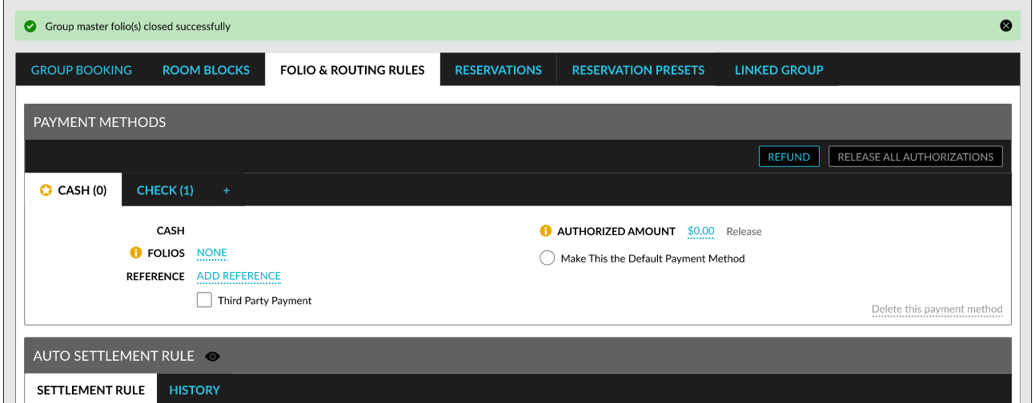
This checkbox is greyed out and cannot be modified. When users click Confirm, the folio balances of the group reservations and the group master will be validated, and the following message will be displayed as a banner: The folio closure of reservation(s) and group is in progress. Once the validation is completed successfully, the following message will be displayed: Group master folio(s) closed successfully.
Validations Performed When Closing Folios
The following validations are performed when closing group reservation folios:
|
Folio |
Validations Performed |
|---|---|
|
Non-Default Folios |
The folio balance must be zero. |
|
Default Folio |
|
The following validations are performed when closing group master folios:
|
Field |
Description |
|---|---|
|
Non-Default Folios |
The folio balance must be zero. |
|
Default Folio |
|
Confirmation Message for Group Master Folio Closure
When users attempt to close a group master folio when both the group master and group reservation folios have zero balance and are closed, the following message will be displayed as a banner in the group once the validations are completed successfully: Group master folio(s) closed successfully. The Summary, All Folios, and the respective guest folio tabs are displayed with a lock icon.
When users attempt to close a group master folio when both the group master and group reservation folios have open balance, the following message will be displayed once the validation is performed: The default folio cannot be closed. There are open group or reservation folios that must be closed. Click Here to view the results. When users click on the Click Here hyperlink, the Results pop-up screen displays the following details:
|
Field |
Description |
|---|---|
|
Confirmation |
The confirmation ID of the reservation or group whose folio is not closed. |
|
Guest Name |
The guest name associated with the reservation. |
|
Type |
The type of account, that is, either reservation or group. |
|
Departure Date |
The date of departure of the reservation or group. |
|
Folio Name |
The folio name of the reservation or group that is not closed. |
|
Folio Balance |
The folio balance of the reservation or group folio that is not closed |
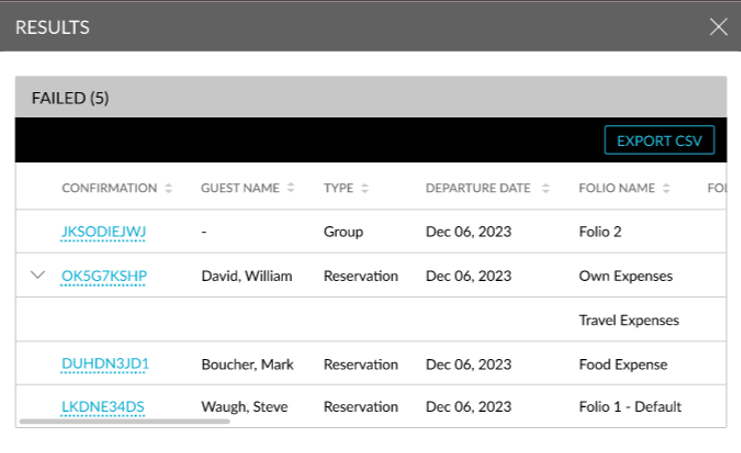
All columns can be sorted. The Results pop-up screen also displays the count of folios with an open balance. The group master folios are listed first followed by the reservation folios. When a group reservation has more than one folio with an open balance, the confirmation ID of the reservation will be displayed with an accordion. When the accordion is expanded, the folio names and their balances will be displayed. The results can be downloaded as a CSV file using the Export CSV option.
When users attempt to close a group master folio when the reservation folios have a zero balance, but the group folios have an open balance, in this case the default folio of the group will not be closed. The following message will be displayed as a banner: The default folio cannot be closed. There are open group or reservation folios that must be closed. Click Here to view the results. The results of the group folios that have an open balance can be viewed using the Click Here hyperlink.
When users attempt to close a group master folio when the reservation folios have an open balance, but the group folios have a zero balance, in this case the default folio of the group will not be closed. The following message will be displayed as a banner: The default folio cannot be closed. There are open group or reservation folios that must be closed. Click Here to view the results. The results of the group folios that have an open balance can be viewed using the Click Here hyperlink.
Post Charges to Closed Folios
When the default folio of a group master is closed and users add or transfer charges to any of the closed folios, the default folio will be reopened. The default folio will also be reopened when any of the closed folios are reopened by users with the Stay_OverrideClosedFolio permission assigned.
The auto-close folio and delay auto-close folio operations will be performed only when the validations are completed successfully.
Once the folios are closed, a record is created for the same in the Audit Log screen (Reports ➜ Audit Log).